

/ and acts on the session instead of going to the agent as a message. This page lists every command for Codex and Claude Code sessions and for the home screen, with what each one does and when it’s refused. For @ file mentions and $ skill mentions, see The composer. The keys that move through the list are in Keyboard shortcuts.
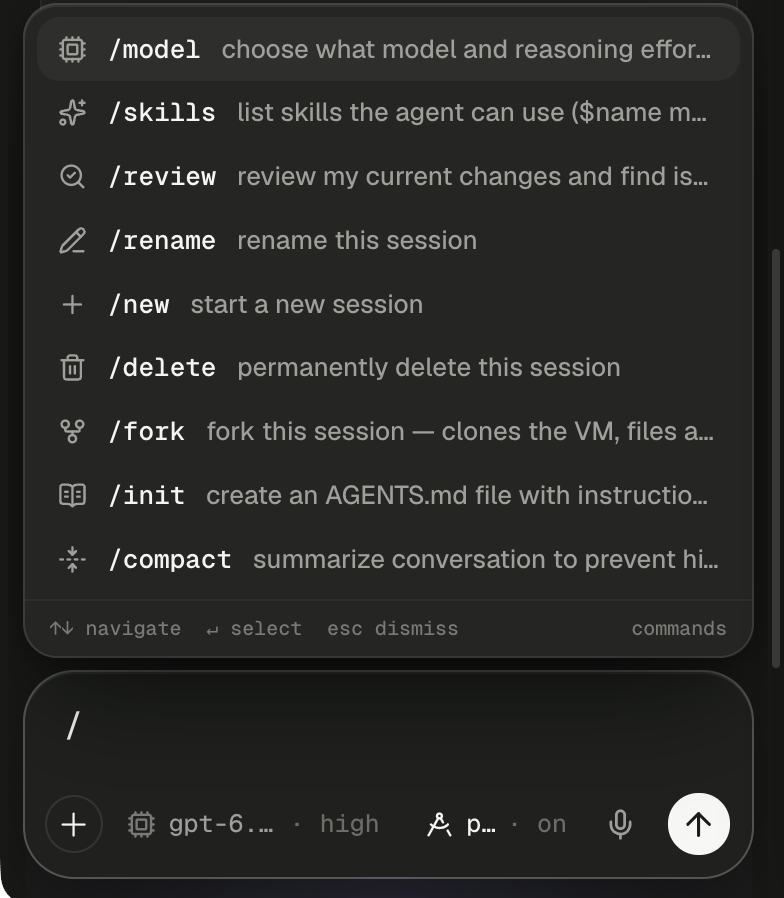
A slash at the start of a message opens the command list above the composer.
How commands work
The list opens only when the whole message is a command:/ as the first thing you type, with no space yet. In a Codex session, a slash in the middle of a sentence types a plain slash. In a Claude Code session, it opens the list of skills instead, so you can mention one as /name. Type more letters to filter. Names that start with what you typed come first, then names that contain it, then commands whose description mentions it.
Each row shows an icon, the command, an argument hint where the agent’s command takes one (such as
[name] or <instruction>), a short description and, for some rows, a tag. The list depends on the session’s agent. A Codex session gets Codex’s own command list, minus the commands that only make sense in a terminal, plus Alpha’s own. A Claude Code session gets Alpha’s commands first, then Claude Code’s own and the session’s own. On the home screen you get the list for the agent the next session will run, acting on that next session.
Commands don’t wait in the queue. Some work while the agent is busy. The rest are refused with ”‘/review’ is disabled while a task is in progress.”, so wait for the turn to end or stop it first. The table below says which is which.
Use Alpha’s commands
These are Alpha’s commands. Both agents get most of them. The During a turn column says whether a command still works while the agent is working.If you don’t see
/harness, your Alpha offers one agent only, so there’s nothing to choose.Run Claude Code’s own commands
Claude Code only In a Claude Code session, the list goes on past Alpha’s commands with Claude Code’s own and the session’s own. Alpha doesn’t handle these. It passes them to Claude Code, which runs each one as a turn in the session. The tag at the end of the row says where a command comes from.
The session’s own commands join the list when you open it, so a skill the agent wrote a minute ago shows up next time you type
/. A few things work differently from Alpha’s commands:
Which commands does Alpha refuse?
Some commands are listed but can’t be used yet, and some are refused outright. In Codex sessions, commands that Codex offers but Alpha hasn’t wired up are greyed out and marked not in Alpha yet. Picking one says “/resume isn’t available in Alpha yet.” The list follows the Codex version Alpha runs. Currently it holds/experimental, /approve, /memories, /hooks, /archive, /resume, /recap, /goal, /agents, /side, /btw, /export, /warnings, /apps, /plugins and /subagents. Commands that only make sense in a terminal, such as /quit, /clear, /copy, /theme and /logout, aren’t listed at all. Typed anyway, they get “Unknown command: /quit”.
In Claude Code sessions, these commands are left out of the list. Typed anyway, each is refused with “/name isn’t available in Alpha —” followed by the reason in the table.
In every session,
/permissions isn’t offered, because every session runs with full access. Typed, it gets “/permissions isn’t offered — every session runs with full access.” See What about permissions?
Read the session status card
/status posts a Session status card into the transcript. It’s the quickest way to check what a session runs on before you ask for something big. On the home screen the same command shows the Next session card instead, described on The home screen.
Messages you might see
A
/rename name longer than 80 characters is cut, not refused. A command typed with files attached in a Codex session is sent to the agent as an ordinary message. For problems beyond these, see Troubleshooting.
Mention files, sessions and skills
Two more characters open their own lists in the composer. They are covered in full on The composer.Next steps
Queue, steer or stop
A command refused mid-turn needs an idle session. Stop the turn, or let it finish.
Choose the agent and model
Why
/effort and /agents exist only in Claude Code, and when ultracode pays off.Branches, commits and pull requests
Each
/review option in detail, and how to read the Workspace diff card.Keyboard shortcuts
The keys for the palette, the composer and the workspace on one page.