

What does a turn look like?
A turn runs from your message until the agent stops. Everything the agent does between two replies collapses into one line, so even a long turn stays easy to read.Open the folded actions
The tally counts each kind of action, in the order it first appeared and with thoughts last. The kinds are command, edit, search, plan update, tool and thought. While an action runs, its icon bobs and the tally shimmers. In a narrow column, hover the row to read the whole tally. Click the row and each action becomes one plain-English line, such as “Ran the tests”, “Started the dev server”, “Edited BookingForm.tsx” or “Queried the database”. A running line reads in the present (“Building the project”). A failed one ends in a red pill such as exit 1. A failed command is not a failed turn: the agent usually reads the error and fixes it on the next line. Click a line to open its detail:
A line that reads a skill, such as “Read the slides skill”, opens nothing. Its detail stays closed.
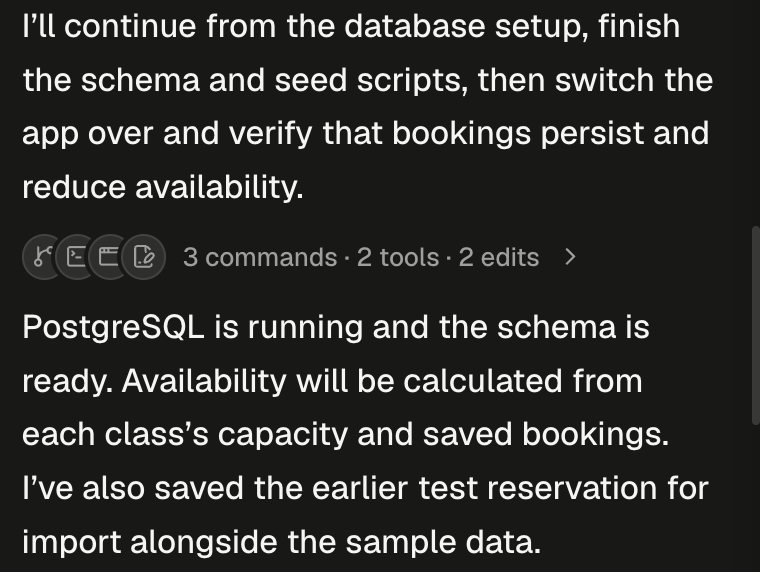
Everything the agent did between two replies, folded into one line with a tally.
What does the agent do while I wait?
Between outputs, a pixel loader shows a verb that changes every 3 seconds (“Forging…”, “Thinking…”, “Reading the workspace…”) and a timer. The timer appears after 3 seconds and restarts with each pause, so it measures this gap, not the whole turn. The verb gets specific when there is something specific to say:
Between outputs, the loader shows a verb and how long this pause has lasted.
Open files from the chat
A file the agent names in its reply is a link. Clicking it opens the file as a workspace tab, at the line when one is given. Hover to see where it goes (“Open src/app.ts:42”).
Paths outside
/workspace, folders and addresses such as localhost:3000 aren’t opened as files.
Follow sub-agents and workflows
The agent can split a task between helpers, called sub-agents, each with its own task, working in the same machine.Sub-agent cards
Each sub-agent gets a card where it was spawned. The header shows its name (Codex gives each one a nickname), its role, its model and effort, and a status pill with its time. The body shows its task (more for the rest), a live feed of its steps as action lines, its to-do list, and its answer once done.
A roster above the composer lists the turn’s sub-agents: a dot each, up to three names with +N, and a count such as 2 working (or 3 done once they finish). Click it to see each agent’s activity; click an agent (“Show this agent in the transcript”) to jump to its card.
Sub-agents never stop to ask you anything. Alpha tells them no one is there to answer, and they carry on with their own judgement, so every question card you see comes from the main agent. In Claude Code, the turn keeps running until its last sub-agent finishes.
Workflow cards
Claude Code only A workflow is a team of agents Claude runs in the background, in phases. With the session’s effort on ultracode, Claude runs one for every substantive task, and it may start one in any session. Writing the word “ultracode” in a message asks for one for that turn; see Choose the agent and model. When the workflow finishes, Claude follows up on its result, and your turn keeps running until then. The card’s pill counts finished agents, such as working · 3/8, then reads done, failed or stopped. The card lists each phase, with each agent’s current tool, tokens, time and result. Stop on the card (“Stop this workflow and its agents”) stops that workflow only; the composer’s Stop ends the whole turn, workflows included.If you don’t see Claude Code on the home screen, it isn’t turned on for your Alpha.
Find, copy and export
A long session opens with its newest 2 turns, so it appears at once. Older turns load as you scroll up, or all at once from the “Show N earlier messages” marker at the top. Press ⌘F to find text: Alpha first shows every loaded message so the browser can search them. Turns not loaded yet aren’t searched until you scroll to them. Use Ctrl instead of ⌘ on Windows and Linux. To export the transcript, scroll to the top of the session, hover the first message and click More (⋯) → Export as Markdown. The transcript is append-only: you can’t edit a sent message or regenerate a reply. To try another direction and keep this one, fork the session. Values of your secrets that are 8 or more characters long show as[redacted], in the transcript and in exports. An email address or a plain web address is left as it is.
What if a turn fails?
A failed turn shows one red card saying what failed, sometimes with a details fold. The workspace and the transcript up to the failure are kept, and your next message carries on from there.
A turn you stop isn’t a failure. For other messages, see Troubleshooting and FAQ.
Next steps
Queue, steer or stop
Send a second message without waiting, or stop a turn heading the wrong way.
Plan mode and the agent's questions
Answer the cards that make a turn wait, and approve a plan before any code.
Choose the agent and model
Pick Codex or Claude Code, set the effort, and turn on ultracode workflows.
Files and uploads
Where the files the agent links to live, and how to download them.