

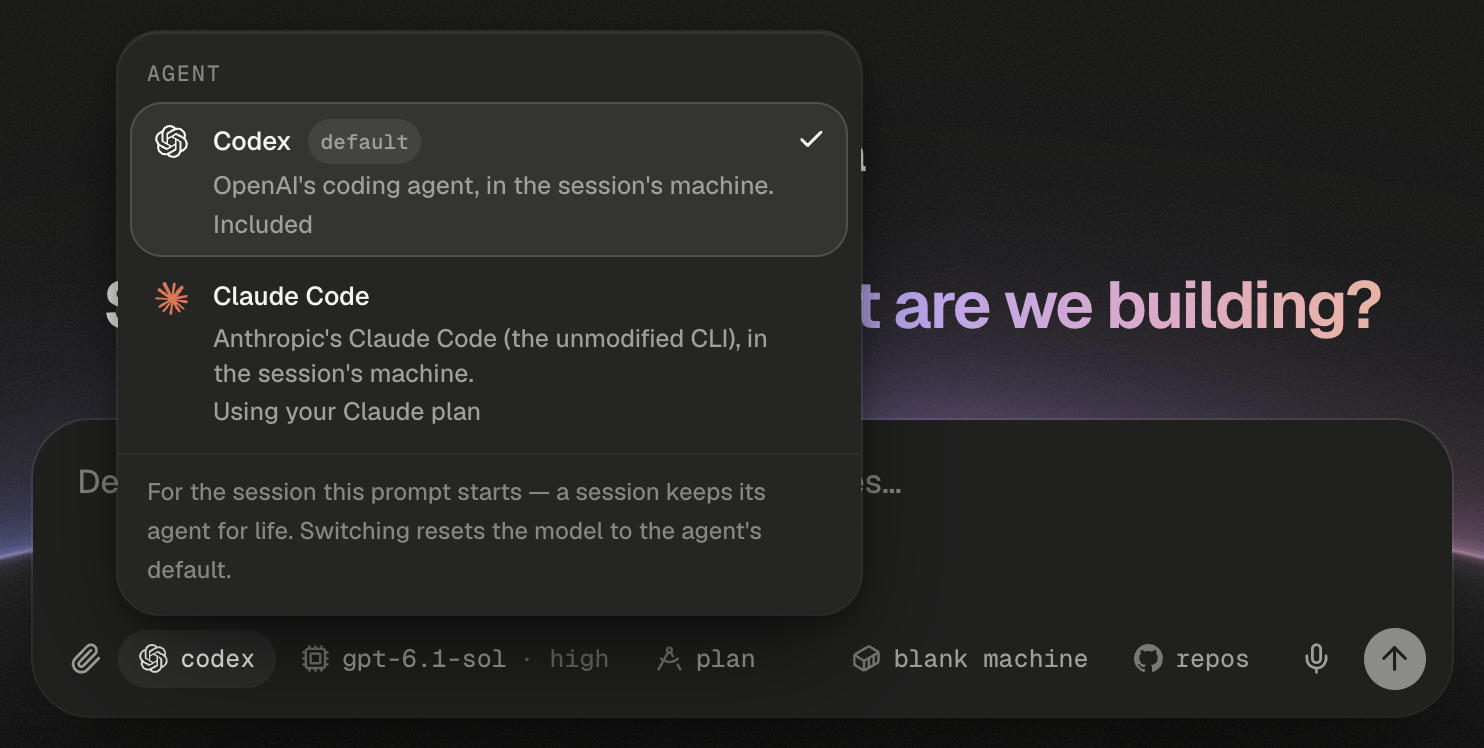
You pick the agent on the home screen, before the session exists.
Codex or Claude Code?
Codex is OpenAI’s coding agent. Claude Code is Anthropic’s own command-line agent, run unmodified. Both work in the session’s machine, with the same workspace, Preview, database, skills, MCP servers and publishing. The differences are in how you talk to them.Pick the agent for a new session
You choose the agent on the home screen, with the first chip in the composer. The chip shows the agent’s mark and name, and its tooltip reads “The agent (/harness)”. Click it and pick Codex or Claude Code from the Agent popover, or type/harness codex or /harness claude. A name it doesn’t recognise gets “/harness takes codex or claude — not “x”.”
Each row’s last line says how that agent runs for you: “Included” means it runs on your Alpha’s keys, and “Using your Claude plan” means it bills your own plan. A row that reads “Connect your Claude account to use it” (or ChatGPT) opens that sign-in when you pick it. Once you’re signed in, the agent is picked for you. If the agent you used last can’t run for you right now, the chip shows a warning dot and its tooltip says which agent runs instead, for example “Claude Code isn’t available to you right now, so this prompt’s session runs Codex.”
Switching agents resets the model and effort to the new agent’s defaults, because each agent has its own models. Plan mode carries over.
If you don’t see the agent chip, your Alpha offers only one agent, and every session runs that one.
Why can’t I switch agents inside a session?
A session keeps its agent for life. Codex and Claude Code can’t read each other’s history, so a switch would quietly throw away everything the agent knows about your work. The badge beside the session title names the agent, and/status lists it as Harness.
Typing /harness in a session gets “A session’s agent is fixed when it is created — this one runs Codex. Start a new session (/new) to use another.” To move the work, push it to GitHub and start a new session on the other agent with the same repository.
Choose a model
The Model chip sits in the composer, after the agent chip on the home screen. It shows the model’s name, plus ”· high” or similar once you’ve set an effort. Click it, or type/model, to open the Model popover.
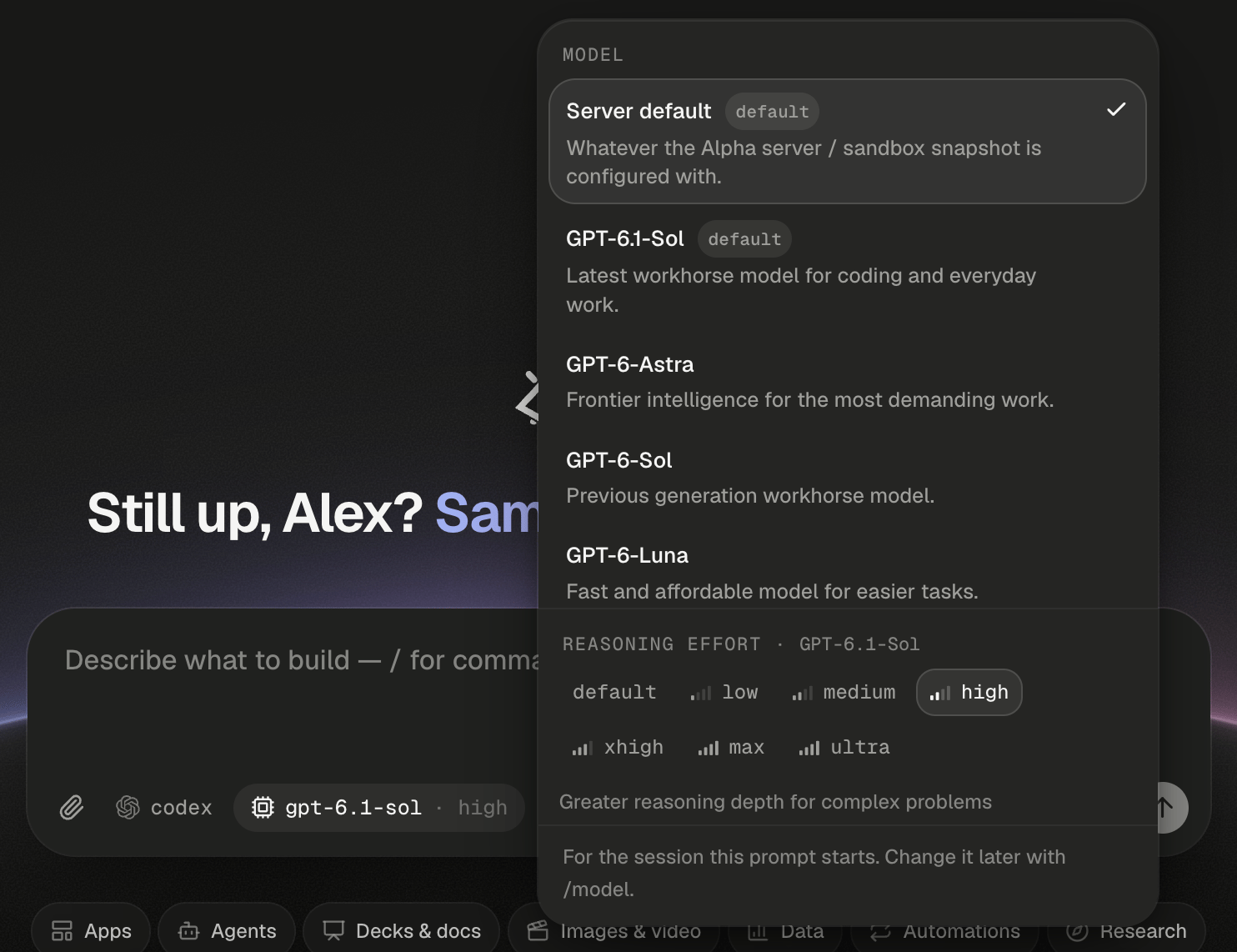
Server default comes first; the effort ladder follows the model in use.
Picking a model resets the effort to that model’s default. Changes apply from your next message; a running turn keeps the model it started with. If Alpha refuses a change, the chip goes back and a banner says why.
In a Codex session, a new model sometimes can’t pick up the agent’s earlier history. The transcript then says “The previous conversation can’t be resumed with the current model — starting a fresh agent session (workspace files are kept).” Restate anything the agent needs from earlier in the session.
Set reasoning effort
Reasoning effort is how long the model thinks before it acts. More effort helps on hard problems and costs more tokens and time. The pills under Reasoning effort are the model’s ladder, after a default pill that leaves the effort to the model. The line under the pills describes the effort you picked.
Each model has its own ladder. A Codex model may list a top rung such as ultra, which is part of that ladder, not ultracode.
In Claude Code,
/effort high sets the effort, /effort auto returns to the model’s default, and a bare /effort opens the picker. In Codex, use the Model chip; picking the same model again resets its effort.
When is ultracode worth it?
Ultracode is xhigh effort plus multi-agent workflows Claude Code only. For every substantive task, Claude writes a workflow that fans the work out to many agents in phases, then waits for them. It shows as an extra pill with a workflow icon after the ladder, on Claude models that offer xhigh. You can also type/effort ultracode. The chip then reads ”· ultracode”.
Use it for work that splits well, such as a migration across many modules or a broad codebase review. For a single bug, xhigh is usually enough and costs far less.
Each workflow appears as a Workflow card in the transcript. The card’s Stop stops that workflow alone; the composer’s stop button stops the whole turn, workflows included. The Usage dashboard records “ultracode” as the effort.
On a model without xhigh, the picker says “Ultracode needs a model with xhigh effort, and {model} has none — it won’t take effect here. Pick another effort, or a model that offers ultracode.” Where your Claude account or organization turns workflows off, the session runs at xhigh without them, and the transcript says so. To ask for one workflow without changing effort, write the word “ultracode” in your message.
What about permissions?
Every session runs with full access. The agent installs packages, runs servers and edits files without asking, because its machine is its own and nothing it does reaches your other sessions. There’s no permissions chip, and/permissions gets “/permissions isn’t offered — every session runs with full access.”
Older sessions left on another mode show a permissions chip with a shield icon, so you can set them back.
Pick Full access and the chip disappears for good.
Run on your own plan
By default the agent runs on your Alpha’s keys. Sign in with ChatGPT and Codex sessions bill to your ChatGPT plan, with your plan’s models in the list. Sign in with Claude and Claude Code sessions bill to your Claude plan. Each session switches on its next message. Usage, costs and your own plan walks through both sign-ins.Next steps
Plan mode and the agent's questions
Works the same on both agents: the agent explores, asks, then proposes a plan.
Follow the agent's work
Read Workflow and sub-agent cards, and stop one workflow without stopping the turn.
Usage, costs and your own plan
See what each model and effort has cost, priced per token.
Slash commands
Every command in Codex and Claude Code sessions, including
/model and /effort.